Ajax Contact Form Builder with Attachments sending and no spam control (drag and drop, reCaptcha, ayah) for Wordpress
The w2 Ajax Contact Form for Wordpress is a complete user friendly and responsive solution to create ajax contact form in Wordpress. Designed to be a flexible plugin, this item offer classics and originals features fully configurables via a Fulll AJAX Admin Plugin panel. You can easily create ( user friendly Drag and Drop form builder) your own forms. Also you can customise quickly your forms apearence by using the plugin admin interface.
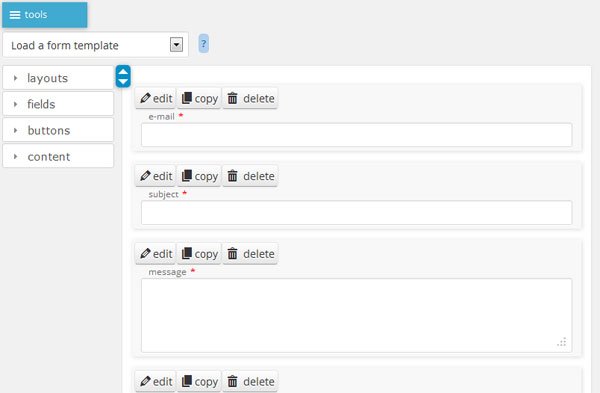
Drag & Drop form builder:
You can easily create your own form templates (add or remove fields) via the Drag and Drop form builder.

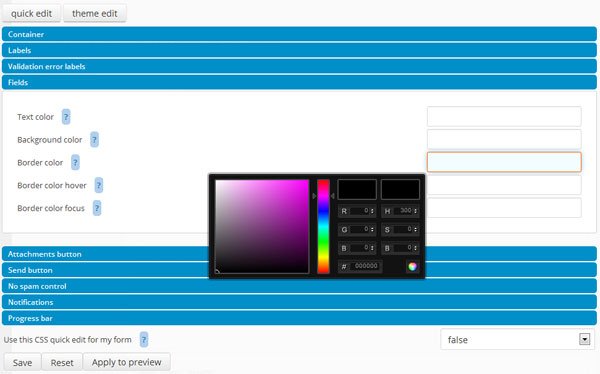
Easy theme customisation:
You can easily edit the apearence of your form by using the quick edit interface. If you need more you can create your own CSS theme by using the theme edit interface ( Full CSS ).

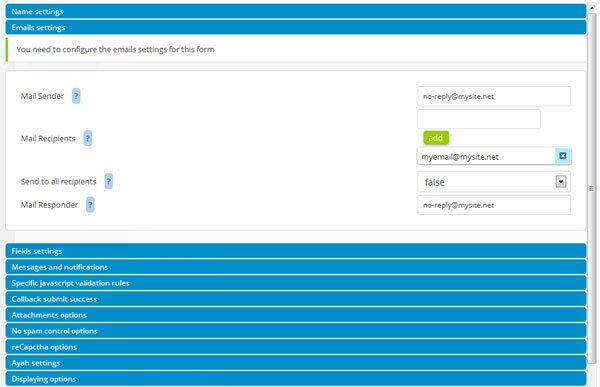
Save mail messages in database:
You can save your messages in database.


Full AJAX plugin admin panel:
User friendly plugin administration.

Version 2.0:
- Added Drag & Drop form builder.
- Added Full AJAX plugin admin panel.
- Added feature to save messages in database.
- Added soundcloud button.
- Added feature for quick CSS edition.
- Added form multi page support.
- Added tooltip support.
No Spam Control (Drag and Drop)
The drag’n’drop No Spam Control is an user friendly alternative to the traditionnal Captcha.
It is not a simple drag’n’drop feature to display the send Button. It is a complete anti spam solution .
The No Spam Control controls the time between each submission (configurable max/min) and generate some hiddens fields with an encryption key (configurable) when the dragger is dropped. The hidden fields are generated with alphanumeric random and Time (encrypted via encryption key) to ensure that the No Spam Control fields are available only for a limited period (configurable).
This is a really safe and user friendly protection. Then it is easy to customise it with CSS.
There is 4 type for No Spam Control:
- basic (simply drag’n’drop)
- colors (drag’n’drop the right color)
- numbers (drag’n’drop the right number)
- shapes (drag’n’drop the right shape)
The plugin allows you to use other capctha solution like Google ReCaptcha or AYAH (are you a human).
Minimum requirements
- PHP version 5.x (PHP5 or higher).
- Wordpress 3.7 or higher.
Theme compatibility – Trial version (Try Before Buy)
You can test the compatibility of the plugin with your theme by using the
Theme Compatibility plugin – Trial Version (just install the plugin in your wordpress).
If the plugin doesn’t display correctly in the front-end or back-end pages of your theme it seems there is a theme conflict (conflict between the plugin and your theme).
The plugin include features to solve theme conflict (Global Settings section), so if there is a theme conflict and you want to buy the plugin you can contact the technical support (send the url of the page where the form is displaying) to know the right configuration of the Global Settings section to solve theme conflict.
Admin Plugin Interface (Try Before Buy)
You can test the Admin Plugin Interface: Demo Back office.
Watch the Videos tutorials.
Standalone version available
PHP and JavaScript Librarys
- This plugin uses some PHP Zend Components (Zend Mail, Zend Mime) for mailling features.
The Zend Mail component is one of the most powerfull and professionnal mailling library. It allows you to deliver clean mail (encodage and attachments) for all mailbox type (desktop or mobile). - It uses classics jQuery plugins like jQuery Ui, jQuery Form, jQuery Validation. All themes (jQuery UI) and translation files for plugins are indluded in the package.
Features
- Multiple or single attachments files (configurable).
- Multiple or single recipient (simultaneously or not).
- Optimized for iDevices (responsive).
- Easy to create your own form (drag & dorp form editor).
- You can create your own form template.
- You can create your own CSS theme and automatically add them to your lists of Theme in the form editor.
- Auto-responder feature (configurable).
- Save messages in database
- You can specify your own fields rules of validation.
- Email message accepts HTML content (configurable).
- You can create several forms and save them in database.
- Inegration in the content of your page “automatic” or via “shortcode”.
- Drag and Drop feature (no spam control) has 4 different model (view live preview).
- Drag and Drop feature (no spam control) is ready for touch screen.
- ReCaptcha integration.
- And more…
Technical Support
For a quick response send me a private message via my profile.
web agency
enjoy !
ChangeLog
if you have already purchased the plugin it is really recommended to install the latest update to fix some bugs and add new features.
Don’t forget to read the file “upgrade_instructions.txt” before to upgrade your plugin installation.
-
version 2.0.29:
- Display messages by form selected
- Added additionnal plugin W2 contact form messages to allow you to display form messages in a front end page (possibility to archive and comment each messages).
-
version 2.0.28:
- Removed AYAH integration.
-
version 2.0.27:
- Fixed problem with add attachment input label customization.
- Fixed PHP < 5.5 error.
-
version 2.0.26:
- Added possibility to specify field selection et csv delimiter for CSV export.
-
version 2.0.25:
- Added disclaimer content type to be able to add disclaimer pop up on form submit (accept or refuse).
- Added possibility to disable mail sending if don’t specify any recipient.
-
version 2.0.24:
- Fixed PHP error for PHP version 7.
-
version 2.0.23:
- Added possibility to use HTML5 multiple file field.
- Added new PHP callback beforeIsValidForm.
-
version 2.0.22:
- Added parameters to specify the default date, min date, max date and year range for each datepicker field on form builder.
-
version 2.0.21:
- Added parameter to specify date format of the datepicker field on form builder.
-
version 2.0.20:
- Fixed PHP error for PHP 7.
-
version 2.0.19:
- Added feature to disable plugin version check.
- Removed fadeIn effect on form list.
-
version 2.0.18:
- Fixed form builder bug for form contains lot of element.
-
version 2.0.17:
- Added timestamp, user IP and URL referer at the footer of the mail message.
- Fixed bug page title edition on form builder.
-
version 2.0.16:
- Added new Google recaptcha.
- Added xlsx entension for attachment file.
- fixed attached file notification undefined.
-
version 2.0.15:
- Fixed dragged element wrong dimension ( width and height ) on form builder for wordpress 4.1.
-
version 2.0.14:
- Fixed wrong auto responder sender name in mailbox.
-
version 2.0.13:
- Added feature to export the saved mails as CSV file.
-
version 2.0.12:
- Added HTML5 data-attached-notification attribute to display text notification for attachment file button.
-
version 2.0.11:
- Fix depreciated notice for mysql_real_escape_string.
-
version 2.0.10:
- Added feature to add “entry incomplete” notification for javascript validation.
-
version 2.0.9:
- Fixed bug for field appearence customisation.
- Fixed bug for custom file input notification customisation.
-
version 2.0.8:
- Added file type notification text customisation on form builder.
-
version 2.0.7:
- Fixed bug for language selection.
- Updated CSS themes.
-
version 2.0.6:
- Added feature to add cc or bcc recipient by using this synthax “bcc:recipient@mail.net”.
- Updated CSS grid layout to center the grid elements.
-
version 2.0.5:
- Replaced form id by form name in messages data tables.
-
version 2.0.4:
- Added feature to load WordPress jQuery UI librarys instead jQuery UI custom package ( only available on back-office ).
-
version 2.0.3:
- Fixed wrong path CSS librarys in fornt end for not logged user when using native shortcode.
-
version 2.0.2:
- Added feature to use native WordPress shortcode feature instead smart library loading.
-
version 2.0.1:
- Added save each field values individually in database.
-
version 2.0:
- Added Drag & Drop form builder.
- Added Full AJAX plugin admin panel.
- Added feature to save messages in database.
- Added soundcloud button.
- Added feature to quick CSS edition.
- Added form multi page support.
- Added tooltip support.
-
version 1.3.1:
- Added missing Zend Validate library files for sending mail via smtp.
-
version 1.3.0:
- : The translation process has changed since version 1.3.0. Now all translation files (PHP and JS) are in the folder languages. The PHP notifications are in the folder languages/php/default/. The .tmx file has been replaced by simple .php files. So if you want to update the notifications check this files.
- The plugin install package has been minifyed by updating the translation process.
- Added feature to specify auto-responder message and subject, the sent and not sent message via the plugin admin panel without editing translation files.
- Added a new feature to export CSS theme created via the source code edtitor. You can generate automatically your custom CSS as a new Form CSS Theme. More infos.
- Added new responsive CSS rules for nospam message box.
- Re-worked CSS theme to center form elements.
- Fixed CSS bug for textarea resizable.
- Added feature to auto configure the path to the wp-load.php file.
-
version 1.2.33:
- Added a new feature to send email to all recipients automatically (without using hidden fields).
- Added dutch (nl) language.
-
version 1.2.32:
- Added translation files for datepicker widget (datepicker will use notification lang parameter).
- Added parameter “auto” to notification lang parameter. This configuration alows you to use your wordpress language as plugin notification lang (only for existing language).
- Possibility to rename the plugin folder (if you need).
-
version 1.2.31:
- Added notification for new plugin version available.
- Fixed CSS (box-sizing) bug for WordPress 3.6 default theme.
-
version 1.2.30:
- Fixed bug for portuguese brazilian language.
-
version 1.2.29:
- Added new translation for portuguese brazilian language.
-
version 1.2.28:
- Added CSS transition for IE10.
-
version 1.2.27:
- Fix bug for placeholder on IE9.
-
version 1.2.26:
- New feature to add attachment files to the auto-responder message.
-
version 1.2.25:
- Add possibility to un-active jquery UI library to disable all UI features (UI wigdets, nospam control).
-
version 1.2.24:
- Add loader for nospam control to display button “send” only when nospam hidden fields are completely loaded (usefull for slow server connexion).
-
version 1.2.23:
- Fix bug for script “specific rules of validation” (since version 1.2.19).
-
version 1.2.22:
- Added automatic detection for additionnal laguages files.
-
version 1.2.21:
- Fix CSS bug for custom file input in IE10.
-
version 1.2.20:
- Possibility to specify different translation file for each form (usefull to use several auto-reponder message).
- Adding new laguage (Portuguese).
-
version 1.2.19:
- Removing breaklines in the javascript plugin instanciation code to prevent problem when the parameter “theme has footer” is “false” (to load instanciation script in the content) with WP theme using “wpautop” feature.
-
version 1.2.18:
- Possibility to add fields value in the auto-responder message (just use shortcode [field_name] in the content of the mail responder message).
- New HTML form template with HTML5 attribute placeholder.
-
version 1.2.17:
- Possibility to configure the parameter “Notification lang” (global settings) to “auto”. In automatic mode the form will use the language of your wordpress. If the language doesn’t exist in your file “w2_cf_notifications.tmx” (you can add your own language) the language used by default will be the english.
-
version 1.2.16:
- upgraded the PHP AYAH library to fix error
-
version 1.2.15:
- Added new validator method for Regular Expression (javascript validation).
- Possibility to update the jquery contact form plugin translation text for “en” and “en_US” language in the file “js/w2_contact_form/localization/message_en.js” and ”../message_en_US.js.
-
version 1.2.14:
- Possibility to configure the page selection list (displaying options) to display all Post Type status (not only published).
-
version 1.2.13:
- Adding method to clean up the temp file generated for PHP hard code integration. If you use PHP hard integration it is really recommended to use this update.
- Fix sending email error when using special character for parameter “site name” (Global settings).
-
version 1.2.12:
- New global settings options.
-
version 1.2.11:
- Progress bar for attachment file upload
- Safety enhancement.
-
version 1.2.10:
- New feature to configure the path of the wp-config.php file.
- CSS transition now available for browser Chrome, Safari and Opera.
-
version 1.2.9:
- New system to reset the plugin database. Make it by clicking the butoon “Reset plugin database” not by un-activating plugin. This system prevents unwanted form data loss when user un-active the plugin.
-
version 1.2.8:
- New callback submit success to create specific javascript function for success submit event. Example you can apply a fade out to the form after success submission.
- version 1.2.7:
- Automatic reloading of AYAH after form submission.
- Fix CSS bug for button send color with CSS theme hot-sneaks.
- version 1.2.6:
- Possibility to use PHP code in HTML source code editor when you integrate the form via PHP hard code (feature only available for PHP hard code integration).
- Possibility to create mail subject template by including existing form fields value.
Example:
Message from [firstname] [lastname] [mail]
- version 1.2.5:
- Fix CSS conflict with some wp theme.
- version 1.2.4:
- Possibility to load all the plugin js librarys in footer (usefull to solve some wp theme conflict).
- version 1.2.3:
- Possibility to not load jquery for WP-themes who do not use the included jquery library of Wordpress.
- version 1.2.2:
- Possibility to not specify email sender to use user email as email sender.
- Fix CSS conflict with some WP theme.
- version 1.2.1:
- Fix PHP error for conflict with other AYAH plugin.
- version 1.2.0:
- Auto-upgrade database feature for the next plugin updates (work for version > 1.1.8).
- Possibility to load jquery UI in the footer (usefull to solve some conflict).
- Possibility to display all Posts Types in page selection list.
- Possibility to unactive color animate effect for js validation notification (usefull to solve some conflict).
- If you upgrade the plugin from an version < 1.1.9 you need to un-active and re-active the plugin to reset the plugin database. Make a copy of your HTML forms source code if you need to keep them.
- version 1.1.11:
- Fix minor PHP notice.
- Possibility to use older version of jquery UI (1.8) for front-office page (to solve JS conflict with some theme and worpdress 3.5).
- version 1.1.10:
- New feature to integrate a form by using PHP hard code (directly in your theme files).
<?php w2_contact_form($id_form = 1); ?>
- New feature to integrate a form by using PHP hard code (directly in your theme files).
- version 1.1.9:
- Fix PHP 5.4 error for $_FILES.
- Fix conflict with wp-recaptcha plugin.
- Fix CSS bug for UI button set on Chrome.
- version 1.1.8:
- Fix AJAX error for site using SSL.
- version 1.1.7:
- Update jquery UI to 1.9 for wordpress 3.5.
- New CSS to minimize conflict with CSS wp theme.
- If you upgrade the plugin from an older version to the 1.1.7 you need to change the HTML class selector class=”shadow” to class=”w2_shadow” for each element of your forms.
- version 1.1.6:
- Fix bug for checkbox fields width in Chrome.
- You can add your own custom file field in your form.
- version 1.1.5:
- Fix bug for fields setting configuration when the form have 0 required field.
- version 1.1.4:
- Fix “submit alert position” to bottom bug of the version 1.1.3.
- version 1.1.3:
- New feature to include several form in the same page.
- version 1.1.2:
- New feature to auto-configure the fields settings section by checking the HTML elements of the form with jquery.
- version 1.1.1:
- You can send your email via SMTP with authentification (example: gmail).
- New method to create your own HTML template for the mail body message.
- version 1.1.0:
- You can send your email via SMTP.
- Fix encodage bug for utf_8 content in the mail message to accept all type of character.
- Fix error message for missing translation language.
- Fix CSS bug for IE9 and custom file input.
- New CSS style (auto-resize) for a better compatibility with WP Theme optimized for iDevices.
- New selection page feature to display the form in different type of page (page, post, portfolio, products).
- Possibility to specify the label for the field value in the body mail message.
- Multi-selection page feature (to display the same form in several pages).
- Message notification after submit position (top / bottom).